Noon#
Noon is a Rust-native 2D animation and interactive graphics engine with Manim-compatible Python authoring, built around a shared semantic scene, a deterministic runtime, and a retained GPU renderer.
Rust and Python expose the same observable scene semantics through shared Rust operations. Python supplies Manim-compatible syntax and arbitrary host callbacks where they are genuinely required; it does not implement a second scene, scheduler, runtime, or renderer.
The demo gallery contains runnable scenes with editable Python source. Captured images and videos show actual Noon-rendered frames.
Initial release candidates#
Registry names are still being chosen. The existing noon entries on crates.io
and PyPI are unrelated projects; use this checkout or the exact candidate files
from release readiness #2433.
The current local package version is 0.1.0. The commands below do not upload
packages or deploy the browser.
First Rust scene#
Install the Rust toolchain pinned in rust-toolchain.toml (1.98.1), then run:
cargo run -p noon-native --example first_lesson
cargo run -p noon-export --example first_lesson -- lesson.mp4
cargo run -p noon-export --example first_lesson -- --png lesson-images
The complete ordinary Rust lesson
uses BlockingScene, a helper function and a loop to construct text, a formula,
and two grouped shapes. It animates the group and admits another text resource
after playback starts. noon_native::run_scene drives the same shared scene and
runtime as async authoring. The facade README shows a
complete application and the current checkout dependency setup. Default features
include native text, Typst, bundled fonts, images and code display; geometry-only
consumers can set default-features = false.
The two export commands pass the unchanged ordinary lesson to
noon_export::output::export_blocking_scene. An installed FFmpeg and a supported
native GPU driver are required; a desktop window is not. The packaged example
writes 60 frames at 320×180 and 30 FPS. It executes source once, seals the same
owner's bounded history, then uses the shared frame policy and renderer for PNG
or MP4. Required callbacks/input and retained-history audio are outside this
finite visual profile. See the export README for
the public call, source budgets, cancellation and output controls.
First installed Python scene#
Build with CPython 3.11+ and the pinned Rust toolchain:
python -m pip install build
python -m build
The default build creates both a source archive and a native wheel, building the wheel from the extracted source archive. Install the wheel for your interpreter and platform into a fresh virtual environment:
python -m venv .venv
# Activate .venv using the command for your shell, then:
python -m pip install /absolute/path/to/noon-0.1.0-<python>-<abi>-<platform>.whl
Save first_lesson.py in your working directory and run:
noon first_lesson.py                       # Native viewer
noon first_lesson.py --headless            # Execute without a window or GPU
noon first_lesson.py --snapshot lesson.png --time 1.75
noon first_lesson.py --mp4 lesson.mp4 --fps 30000/1001 --width 1280 --height 720
python -m noon_native is equivalent to the noon command. The wheel includes
the native engine and canonical Python facade, and declares NumPy and SciPy as
dependencies; an installed wheel needs no PYTHONPATH or Rust compiler.
Rendering requires a compatible graphics driver. MP4 output additionally needs
an installed FFmpeg with H.264 encoding; it does not use a browser or Node.
Source builds require a native C toolchain and the platform's graphics build
dependencies. Optional native Rust audio also needs ALSA development headers on
Linux. The native Python README describes the
supported finite-scene profile, export controls and explicit limitations.
Browser access and candidate verification#
The hosted playground is available directly; using it does not require installing an npm package. Browser candidates are complete versioned site archives containing the generated WASM, workers, Python facade, editor and assets, with source/build identity and checksums. External Pyodide/CDN dependencies still require network access. At release, retain that archive with the matching source tag so the moving playground URL is not the only record of the released browser.
Candidate validation uses the packaged files:
python scripts/check-rust-packages.py --wasm --output dist/rust
python scripts/check-python-package.py dist/<wheel>.whl --sdist dist/<source>.tar.gz --render --mp4
The Rust check installs the archive graph into an outside-checkout consumer; the Python check creates a fresh outside-checkout environment and runs the installed console command, PNG capture and decoded MP4 checks. Platform tags and support claims must match the successful candidate matrix recorded in #2433. Free-threaded Python and platforms absent from that matrix are not qualified by a Linux source build. See CI evidence tooling for candidate workflow commands and artifact retention.
Architecture#
The main data path is intentionally small. Focused diagrams carry the detailed publication, locality, callback, deployment, and ownership contracts instead of crowding them into one picture.
D2 source · Domain projections · Revision and lifetime model · Locality propagation · Callback transaction · Current ownership · Python worker topology.
The overview separates responsibilities rather than advertising another framework:
- Authoring supplies Rust/Python ergonomics and invokes shared semantic operations.
- Semantic scene (
SemanticStore) owns authored identity, structure, declarations, and persistent state. - Lowering (
noon-compile) derives replaceable execution data such as slots, tracks, reactive dependencies, and resource projections. - Runtime/session owns effective time-varying state, ordering, completion, wake/sleep, and coherent publication.
- Renderer owns retained GPU resources and dirty draw work only; native/browser hosts own platform lifecycle.
Normal native and single-context Rust/WASM engine boundaries are typed in-process Rust boundaries. Serialization is reserved for explicit codecs or genuine cross-context transport. The architecture guide is the single normative source for the contracts and roadmap.
Authoring#
For supported 2D features, ordinary ManimCE source should require only the import change from manim to noon:
from noon import *

class Demo(Scene):
    def construct(self):
        circle = Circle(radius=0.6, color=BLUE).shift(LEFT * 2)
        square = Square(side_length=1.2, color=PINK)
        square.next_to(circle, RIGHT)

        self.play(Create(circle), Create(square))
        self.play(
            circle.animate.shift(RIGHT * 2),
            square.animate.rotate(45 * DEGREES),
            run_time=2,
            rate_func=smooth,
        )
        self.play(Transform(circle, Square(1.4, color=PURPLE)), run_time=1.5)
        self.wait(0.5)
Rust scene authoring uses ordinary sequential code and the same semantic operations
as Python. Scene::script turns play and wait awaits into the engine's existing
completion boundaries:
use noon::{Color, Create, Scene, Vec2};

fn main() -> Result<(), Box<dyn std::error::Error>> {
    let program = Scene::script(|scene| async move {
        let circle = scene.circle(0.6)?;
        scene.set_fill(&circle, Color::BLUE, 0.5)?;
        scene.shift(&circle, Vec2::new(-2.0, 0.0))?;
        let square = scene.square(1.2)?;
        scene.set_color(&square, Color::PINK)?;

        scene.play((Create::new(&circle), Create::new(&square))).await?;
        scene.play((
            circle.animate().shift(Vec2::new(2.0, 0.0)),
            square.animate().rotate(std::f64::consts::FRAC_PI_4),
        )).await?;
        scene.wait(0.5).await?;
        Ok(())
    })?;
    noon_native::run_live_program(program)?;
    Ok(())
}
Tuples, arrays and vectors play their animations in parallel. Use play_with(request, AnimationOptions::new().run_time(2.0)) for explicit timing. Animation builders own
their handles and arguments; they capture the current effective state when play
starts. Saving a Rust builder across an earlier play therefore uses that play's
completed state. Python's .animate target is copied when the builder is created.
Single-object method-target rotation uses point correspondence, as in Python's .animate.rotate.
Updaters are owned by the scene and return a registration that can be removed at the current authored time:
let turn = scene.add_updater(&line, |target, frame| {
    target.rotate_about_origin(frame.dt())
})?;
scene.wait(2.0).await?;
scene.remove_updater(&turn)?;
The updater target reads and writes the current ordered effective callback phase.
Ordinary scene edits change persistent authored state. scene.authored(&object)
and scene.effective(&object) make that observation choice explicit.
The same persistent set_color, set_fill, set_fill_opacity, set_stroke_width, and shift
operations are available on an ordinary Scene before and after its owned
execution begins. For example, synchronous setup uses the same calls:
let mut scene = Scene::new();
let circle = scene.circle(0.6)?;
scene.set_fill(&circle, Color::BLUE, 0.5)?;
scene.shift(&circle, Vec2::new(-2.0, 0.0))?;
scene.add(&circle)?;
The script capability delegates these edits to its Scene. Validation and atomic
publication stay in that shared operation path, including while execution is
running. Borrowed LiveSession operations serve explicit external-session and
callback integration.
Families use the same scene capability for construction, membership, and layout. Objects can be grouped directly from an array of references. The group remains a semantic family, including when a member is shared with another group:
let first = scene.circle(0.4)?;
let second = scene.square(0.8)?;
let group = scene.family([&first, &second])?;
scene.arrange_family_with_options(
    &group,
    &FamilyArrangeOptions::new(1.0, 0.0, 0.3, true),
)?;
scene.add(&group)?;
scene.play(group.animate().shift(Vec2::new(1.0, 0.0)).scale(0.8)).await?;
scene.play(group.animate().rotate(0.25).set_color(Color::ORANGE)).await?;
scene.wait(0.5).await?;

let third = scene.circle(0.3)?;
scene.add_family_members(&group, [&third])?;
scene.arrange_family_in_grid_with_options(
    &group,
    &FamilyGridOptions { columns: Some(2), ..Default::default() },
)?;
Import FamilyArrangeOptions and FamilyGridOptions from noon for this example.
Owned group animation currently supports one added flat vector family per play,
with fixed topology and shared scale/rotation pivots. It uses the existing family
transform interpolation, member lag, and completion rules. Nested/content-owning
groups, effects, table/graph metadata, and mixing a group target with other animation
leaves fail explicitly. The paired Rust
and Python diagram tutorial is
available as Move the whole diagram in the demo gallery; run its native version
with cargo run -p noon-native --example ordinary_group_animation.
Mixed object/family collections use MobjectTarget::Object(&object) and
MobjectTarget::Family(&family). Construction accepts arrays, vectors, and borrowed
slices of these typed targets. remove_family_members detaches direct members;
remove(&group) detaches the group from the scene. Both preserve semantic identity.
Layout uses authored bounds during setup and current effective bounds after
execution starts. effective_layout(&object) and effective_family_layout(&group)
read the current publication; cold scenes return an explicit error for these
effective queries.
Scene::script runs initial setup through the first await, lowers that scene once,
then lets the native or direct Rust/WASM host drive it. The same owner is available
to rendering and input while the script waits. Async helper functions can compose
these boundaries; pending external futures and simultaneous independent scene
awaits are rejected. Compose concurrent animations in one play instead. Arbitrary
source code remains opaque for replay/preparation admission.
Synchronous Rust authoring prototype#
Desktop hosts also expose noon_native::run_scene, which accepts ordinary Rust
functions. play and wait keep the author at that statement until its existing
logical completion and publication boundary has been admitted. The host continues
servicing rendering, input, and updaters through its normal event handlers.
use noon::{BlockingScene, Color, Mobject, ScriptError, Vec2};

fn move_right(scene: &BlockingScene, square: &Mobject) -> Result<(), ScriptError> {
    scene.play(square.animate().shift(Vec2::new(1.0, 0.0)))?;
    scene.wait(0.25)?;
    Ok(())
}

fn construct(scene: &BlockingScene) -> Result<(), ScriptError> {
    let square = scene.square(1.0)?;
    scene.set_fill(&square, Color::BLUE, 1.0)?;
    scene.add(&square)?;
    for _ in 0..2 {
        move_right(scene, &square)?;
    }
    assert!((scene.effective_layout(&square)?.center.0 - 2.0).abs() < 1e-5);
    Ok(())
}

fn main() -> Result<(), Box<dyn std::error::Error>> {
    noon_native::run_scene(construct)?;
    Ok(())
}
The desktop runner currently targets Windows, Linux, and macOS and owns the window event loop on its calling thread. It uses one scene/runtime and one realtime clock; it does not spawn an authoring thread or precompute the source's future decisions. Closing the host during a wait returns cancellation rather than a completed play.
The direct WASM prototype uses the same ordinary Rust source with WebAssembly
JS Promise Integration (JSPI). Enable noon-web/blocking-scene explicitly to build
that host. Such a package requires a JSPI-capable browser at module initialization;
the default browser package keeps its existing requirements. The browser host
suspends the author's call stack and carries only completion notifications across
the browser boundary. All scene/runtime operations remain typed Rust calls.
This is an opt-in host prototype, not a replacement for the portable async path. The same source function is exercised by the synchronous authoring example and its Python counterpart.
The initial fluent animation slice supports individual planar objects, Create,
FadeOut, and animated shift/fill/scale/rotation. Shared engine admission still
applies, including the restriction on first updater registration for targets added
after execution bootstrap. Constructors create detached handles; add or an
introducing animation attaches them, and stale/foreign handles return errors.
Families can be constructed and laid out in scripts; fluent family animation
requests remain a separate follow-up. See the paired
MovingAround,
RotationUpdater, and
family arrangement sources,
or shared_authoring.rs for explicit typed
lowering and execution integration.
Paints, effects and shader materials#
Paints change a surface's fill; effects treat its rendered appearance; camera
Bloom treats the selected view. Objects retain ordinary geometry, layout and
animation. Named attachments let you animate independent treatments through
.animate.set_effect(...). set_glow(...) addresses the canonical "glow"
attachment, while GlowPulse temporarily owns intensity and restores its captured
value. Radii use scene units unless written as Pixels(...).
The composed-effects lesson
creates a VGroup named treated, then uses ordinary authoring:
treated.add_effect(Blur(radius=Pixels(0)), name="soften", scope="composed")
treated.set_glow(radius=Pixels(8), intensity=0, color=Color(0.35, 0.65, 1),
                 scope="composed")
self.play(treated.animate.set_effect("soften", radius=Pixels(2))
          .set_effect("glow", intensity=1.6), run_time=2, rate_func=smooth)
| Implemented profile | Use | Boundaries |
|---|---|---|
| Compatibility 2D | Image/linear/radial/noise/hatch fills; ordered Glow, Blur, Shadow, Pixelate and seeded dissolve | Composed effects require supported painter isolation; backdrop sampling uses an explicit bounded painter prefix |
| Linear HDR | Checked material emission, camera Bloom and qualified composed Blur | Primary planar view; float blending/MSAA support and target budget required; unsupported HDR operators, insets and spatial rows reject |
PaintedPointwiseV1 WGSL |
Reusable material color/coverage with typed controls, declared coordinates, authored time and seed | Compatibility output; composed scopes use scene/output-pixel coordinates; source point morphs and arbitrary render/compute passes are excluded |
Custom authors prepare an immutable trusted WgslEffectProgram and attach a
ShaderEffect by name. Parameter keys belong to their schema; ordinary target
animation and seek reuse the program. shade returns unassociated encoded RGB
and a coverage multiplier; the renderer combines source coverage and object/scope
opacity once. See the executed material lesson
and extension contract.
Quality, color/alpha rules, independent references and explicit unsupported combinations live in the effects contract. Profiles use fixed declared quality; unsupported capabilities and budgets reject before replacing published output. Native Rust, direct Rust/WASM and browser Pyodide have separate execution evidence; native CPython integration and the remaining performance/promotion gates stay open in #1897 and #2015.
Code blocks#
Code displays source with native syntax highlighting and preserved indentation.
Supply the source and its language; shared Rust code expands tabs at column stops,
shapes complete lines, aligns the optional line-number gutter, and sizes the
background. Scene authors do not need to color or position individual tokens.
from noon import *

class CodeExample(Scene):
    def construct(self):
        listing = Code(
            code_string="def square(x):\n    return x * x",
            language="python",
            formatter_style="monokai",
            tab_width=4,
            background="window",
            paragraph_config={"font_size": 24},
        )
        self.add(listing)
The native Rust equivalent uses the same admission, layout and retained resources:
use noon::{Code, CodeBackground, CodeOptions, Scene};

let mut scene = Scene::new();
let listing = Code::new(&mut scene, "def square(x):\n    return x * x", CodeOptions {
    language: Some("python".into()),
    formatter_style: "monokai".into(),
    background: CodeBackground::Window,
    ..Default::default()
})?;
scene.add_many(&[listing.family().into()])?;
Python also accepts code_file=...; Rust provides Code::from_file. These are UTF-8
host input helpers. Explicit language takes precedence over filename detection.
Without a recognized filename or first-line language marker, use an explicit
language for highlighting. Code.get_languages_list() and
Code.get_styles_list() enumerate the native profile; supported themes are
vim, monokai, friendly, and emacs. Unsupported names and Python Pygments
style classes produce explicit errors.
Spaces, trailing whitespace, and all empty lines are retained. tab_width accepts
0 through 256; zero removes tabs. This is a source display, not a formatter or
automatic dedenter. code_lines, line_numbers when
enabled, and background are ordinary scene targets. In Rust, line(index)
returns a retained text Mobject and line_source(index) reads its canonical
expanded source. Family copies, transforms and animations reuse the existing
semantic engine. The code Cargo feature is enabled by default and depends on
native text; no Python or JavaScript process is needed by native Rust.
The current Manim-compatible constructor is implemented for this native profile; full Pygments lexer/theme parity, arbitrary style classes, glyph-child indexing, and the untouched upstream example's semantic/raster qualification remain owned by #2193. Leading and trailing empty lines are deliberately preserved, including those Manim's Pygments preprocessing may strip. See the paired Rust and Python examples.
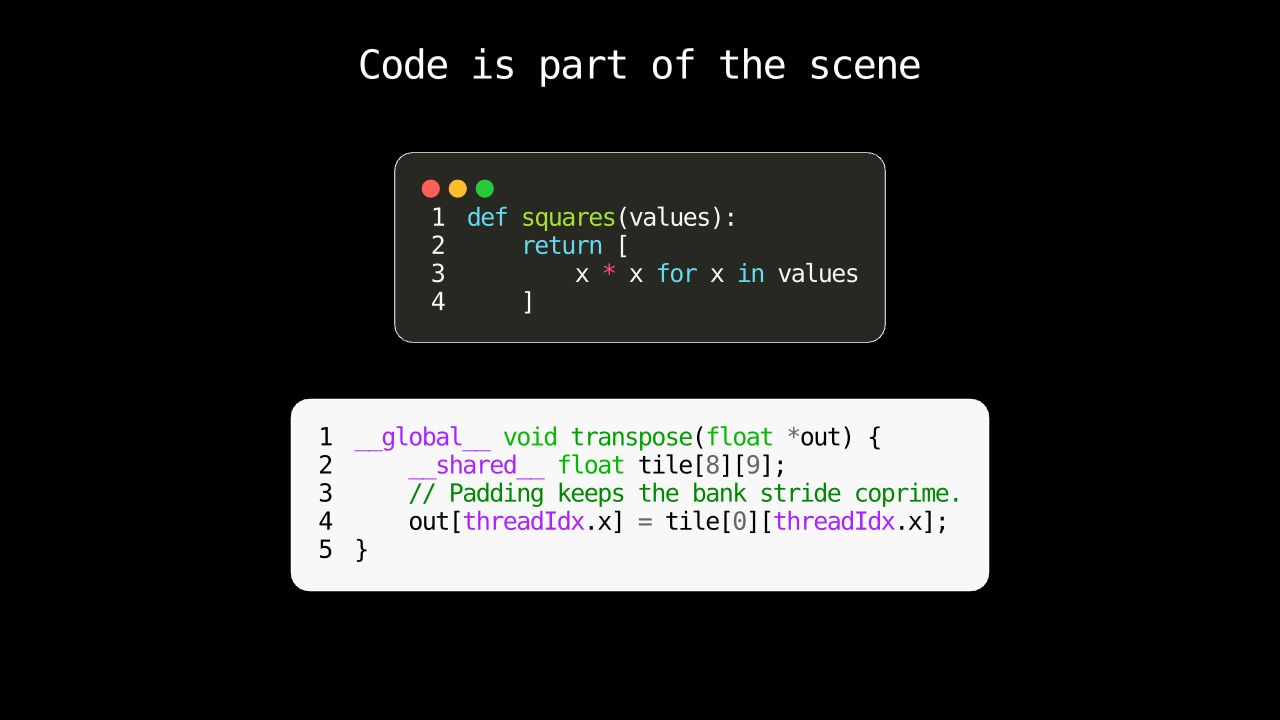
This frame is captured from the native retained renderer by
crates/noon/tests/code_block_raster.rs; the paired browser checks render the
same scene through direct Rust/WASM and the production Python worker.
LaTeX in a scene#
The browser loads the optional compiler when scene source references TeX APIs such as MathTex, or requests TeX-backed numeric labels. Use these APIs directly from ordinary Python. See the LaTeX lesson.
Source-declared click indication#
An authored primary click can run a restoring Indicate without a Python callback or per-frame Python work. The current action supports filled analytic Circle and Rectangle targets, and the Indicate must name the same target:
self.on_click(shape, Indicate(shape, run_time=0.4))
The Rust equivalents publish the same semantic binding before or during live authoring:
scene.on_click_indicate(&shape, IndicateOptions::default(), AnimationOptions::new().run_time(0.4))?;
// Or, after execution starts:
live.on_click_indicate(&shape, IndicateOptions::default(), AnimationOptions::new().run_time(0.4))?;
The action uses restoring there_and_back timing. A click on an already active target is ignored. Clicks do not interrupt an active authored segment or signal/host driver. Input remains available after the introduction, including when playback is paused at its endpoint or its source program has completed; the runtime drives and settles the short effective animation without advancing authored time.
The selection gallery and native pointer_selection example also enable cursor-anchored inspection zoom. Scroll over the canvas to zoom, including during an indication. Rust composes a bounded session adjustment with the effective camera for both rendering and picking; authored camera values and playback remain unchanged. Native hosts opt in with NativeViewportConfig { inspection_zoom: true, ..Default::default() }; browser hosts use inspectionZoom: true. Other gallery lessons leave page scrolling available. Inspection persists across same-session seeks and playback restarts; rerunning a source or replacing its session resets inspection. Stale wheel receipts and excess in-flight worker samples are rejected rather than queued.
Live authoring and integration boundaries#
The crate root and noon::prelude expose ordinary authoring handles, values, live operations, completion, and typed errors. noon::integration is the explicit raw semantic/resource and host plumbing boundary; noon::diagnostics is opt-in debug/export access. Neither namespace creates another scene or runtime.
After creating an execution session, scene.live(&mut session) applies supported persistent edits and animation/completion operations through the same staged semantic/execution publication path. Rust Mobject inspection reads authored/base state; live/effective queries read the latest coherent runtime state. Failed preparation leaves both authored and effective published state unchanged.
Raw integration-store access is deliberately not a live-mutation shortcut: edits outside coherent publication can stale a session and must be handled explicitly. See shared_authoring.rs for the public typed path and docs/architecture.md for the authored/effective and publication contracts.
Indexed spatial meshes#
The native spatial profile uses the same scene, runtime and canvas. Python exposes SpatialScene, Mesh3D and WorldTransformTo; Rust exposes Scene::camera_3d, Scene::mesh, MeshOptions and ordinary world-transform animation requests. UV callbacks run once at construction. Rust validates sampling coordinates, topology and normals, and retains the resulting immutable mesh while motion updates its instance pose.
This profile supports opaque fills without mesh strokes, quaternion rotation and one optional point light. Generated spheres, cubes, prisms, cylinders, cones and tori share the mesh lane. Cylinders and cones extend from zero to height along +Z. Surface resolution counts cells, including both endpoint rows. These explicit conventions do not claim Manim's class defaults or Cairo surface shading. Use WorldTransformTo for spatial animation; the planar .animate path is rejected for mesh objects. The 3D surface lesson uses an ordinary construct() with direct play(), wait(), and move_camera() calls. Noon handles those playback barriers in the browser worker without JS Promise Integration.
Native mesh replacement uses ordinary atomic content publication at a valid authoring barrier. Failed replacement preserves the previous resource and pose; transforms and lights do not regenerate topology. Effective getters read published runtime state, while Rust authored getters keep the base declaration.
Equivalent examples run through the native Rust renderer and the Python browser host:
The complete qualification corpus lives under crates/noon-native/examples and web/python/examples.
Run a Rust example with cargo run -p noon-native --example live_content_switch, or paste its paired Python source into the playground. The shared browser smoke executes the published Python files and checks their rendered output.
The material example opts into trusted WGSL validation:
cargo run -p noon-native --features wgsl-effects --example shader_sweep.
Pass -- --late to introduce shader-bearing objects after execution starts.
The broader example corpus covers callback ordering, sparse reads, family operations, composition, transforms, text, and renderer behavior. Required host callbacks hold authored progress at their ordered barrier; deterministic segments do not require per-frame Python execution when no host-dynamic work is scheduled. Unsupported compatibility behavior remains explicit rather than silently approximated.
The current plotting subset uses linear 2D coordinates and bounded sampled curves. NumberLine and Axes accept standard default ranges and two- or three-value ranges; function plots require explicit sampling ranges. NumberLine remains tipless. Function callbacks run only during bounded plot preparation; the resulting curves are ordinary retained paths. Numeric labels are constructed before playback, and a prepared plot captures its coordinate frame, so recreate it after moving its axes. Synchronized and gapped examples demonstrate bounded timestamped data rather than a streaming graph architecture.
The retained raster image example admits immutable PNG/JPEG or uint8 array resources through shared Rust semantics. The qualification corpus checks decoded dimensions, sampler behavior, opacity, endpoint transforms, and texture reuse. Noon’s decomposed Transform midpoint (22.5°/.875) differs from Manim’s pointwise quad midpoint (19.113565°/.809809), so that sample is recorded as a known boundary while endpoint parity remains explicit.
Current Phase A acceptance status is intentionally not duplicated here; use the Phase A umbrella and the architecture guide for current ownership and invariants.
Native CPython#
Build with CPython 3.11+ and the repository's Rust toolchain, then run Python source through the shared Rust engine without JavaScript, WASM, or a browser:
python3 scripts/build-native-python.py --profile dev
PYTHONPATH=build/python python3 -m noon_native web/python/examples/ordinary_affine_play.py
The window uses Noon's existing native host. Space pauses/resumes, Home restarts,
and the arrow keys seek. Source executes once; bounded deterministic history
supports playback and rewind. Ordinary synchronous, portable and explicit async
constructs use the same Python facade as Pyodide. Geometry, affine animation,
composition, Create/Fade, grow/shrink, indication, focus, passing flashes,
border/fill, plain Text and family Write/reveal, Typst/MathTypst,
arcs/sectors/polygons/angles, retained PNG/JPEG/array images,
built-in object/composed effects, GlowPulse/Dissolve, gradients, procedural
paints, image fills, persistent path edits/queries, family iteration/slices/layout,
coordinate families, preparation-only plots, moving 2D cameras and HDR
bloom/emission, deterministic scalar bindings, section markers, explicit live
segments/content replacement and typed WGSL materials are covered by real
native-extension examples and tests. Finite 3D scenes use the same indexed meshes,
sampled surfaces, world transforms, camera profiles, point lights and fixed labels
as the Rust and WASM hosts. Use --scene ClassName for a file with multiple scenes,
or pass scene_name="ClassName" to run_source.
For execution without a window/GPU, add --headless; this rejects late shader
publication that requires device preparation. The Python equivalent is
run_source(..., prepare_shaders=False). For native GPU output without
a display server, use --snapshot frame.png --time 1 --width 640 --height 360.
Snapshots create a new PNG and refuse to overwrite an existing file. Python can
also call run_source(..., retain_history=True) and prepare_view(scene), then
view.capture(...), view.snapshot(...), view.show() or view.close().
For a finite prepared scene, --mp4 movie.mp4 or view.export_mp4(...) writes
H.264 through the shared native Rust exporter and an installed FFmpeg. Rational
--fps 30000/1001, --start-frame, exclusive --frames or --end-time, and
--hold use the shared export frame policy. --overwrite atomically replaces
an existing output only after a successful export. The source is evaluated once;
export replays its sealed history. Export consumes the prepared view, including
on cancellation or runtime failure, and leaves a previous destination intact
when it fails. Native Python audio export is not part of this profile.
Arbitrary Python callbacks support the sampled --headless profile; prepared
window playback rejects unrecorded callbacks or external input. Advanced plotting,
audio bindings and full gallery parity remain outside this CPython profile.
Native Rust retains its existing broader support. A geometry-only build can omit
native window/capture/resource dependencies with --minimal.
Validate the real extension with PYTHONPATH=build/python python3 scripts/test_native_python.py and python3 scripts/python_host_conformance.py.
Native background audio#
Enable the optional noon-native audio feature to play finite Rust scenes through
the default output device. The example uses the same original score, motion and
three authored sections as the direct Rust/WASM background-music example:
cargo run -p noon-native --features audio --example background_audio
The paired Python lesson also has a native entry point. Both versions use the same shared Rust lesson, scalar bindings, sections and music:
cargo run -p noon-native --features audio --example background_music_lesson
Preparation stays silent; playback starts after the first native picture is ready. The shared Rust mixer supplies loops, trims, fades and overlapping clips on the native player's existing timeline. The geometric example has the same five authored buttons as its browser counterpart: Previous, Play/Pause, Next, Restart and Sound. Both native examples also enable these keyboard controls:
| Key | Action |
|---|---|
| Space | Play or pause; playing a completed scene starts it again |
| Left / Right | Seek backward or forward five seconds |
| Page Up / Page Down | Previous or next authored section |
| Home | Restart at time zero |
| Up / Down | Increase or decrease viewer volume by five percentage points |
| M | Mute or restore the retained viewer volume |
The browser playground uses the same shortcuts when its playback panel is focused. Focused sliders, buttons, menus and the source editor retain their usual keyboard behavior. Shortcuts use unmodified keys, ignore key repeats, and respect the available replay range; section and audio commands require those capabilities.
Seek, section navigation and Restart preserve play/pause state. A paused seek presents the target without starting sound. Playback waits for that picture and the preceding release before admitting a fresh device anchor. Ordinary starts use a 40 ms attack, pauses and seeks release over at most 60 ms, and viewer gain changes use a 20 ms ramp. Viewer volume and mute never alter authored gains or MP4 exports. Inspection zoom leaves audio time unchanged; closing, suspension and output failures retire device output immediately.
Library callers opt in to keyboard controls with
NativeViewportConfig { playback_controls: true, section_navigation: scene.section_navigation(), ..Default::default() }. Authored scene buttons use
the shared Rust input publication and admitted session seek path. The native
control profile requires a freshly lowered finite immutable scene without prior
live execution edits, required callbacks, source continuations, retained history,
external native input routes or effective-driver leases. Deterministic scalar
bindings in the paired lesson are supported; broader live and dynamic numeric-text
profiles remain under
#2263.
The current device profile admits at most 256 immutable clips and mono or stereo
output at 8–192 kHz. It requests a 20 ms callback period within the device's
supported range; the backend may negotiate a different buffer size. This keeps
the requested scheduling headroom consistent across sample rates. A device
timestamp discontinuity above 50 ms stops the run with an explicit output error.
The device backend uses ALSA on Linux, WASAPI on Windows, and CoreAudio on macOS.
Linux builds with the audio feature (including workspace --all-features
validation) require pkg-config and the ALSA development package, for example
sudo apt-get install libasound2-dev pkg-config on Debian or Ubuntu. Native audio
requires macOS 14.2 or newer with the pinned CPAL backend.
Linux ALSA routes through PulseAudio also need the upstream
startup timing fix.
Older Pulse plugins can report missing initial timing as an I/O error; Noon stops
playback when the backend reports that failure. The software-device CI fixture
selects a private build containing the fix without replacing system plugins.
The feature is disabled by default, so visual-only native builds do not acquire
this audio dependency.
Automated output and clock checks do not establish physical-speaker latency or
replace listening tests on supported devices.
Linux capture fixtures use a private PulseAudio sink and a 60 Hz software viewport
to check recorded PCM, output ramps, silent gaps and exact source offsets. This
controlled software profile does not establish resilience under arbitrary host
load. Captured gaps and driver-reported underruns, including a headless attempt,
remain recorded in #2263; their
underlying cause and broader load/device qualification remain open.
Browser playground#
The background-music lesson authors a complete 30-second Python scene with native scalar motion, three sections and the original score A Small Discovery. The gallery's Play with sound, seek, section, volume and mute controls use shared Rust timing. The same source can be exported with H.264 video and AAC audio through the existing native MP4 sink; see audio playback and export for the finite authoring profile and command.
The browser demo combines:
- Rust/WASM scene compilation and evaluation;
- WebGPU rendering with automatic WebGL2 fallback;
- a Pyodide worker for interactive Python authoring;
- shared Rust live mutations and source-session replacement on rerun;
- runtime and GPU profiling counters.
The current semantic Python path keeps the shared Rust/WASM semantic context and its execution session in the authoring worker beside Pyodide. Python calls shared operations synchronously through handles; the semantic engine endpoint leases the existing player in that same context. A separate render owner receives derived resource bundles and execution deltas over the actual worker boundary, using transferable buffers or a shared mailbox. Rendering can fall back to the main thread without moving semantic/runtime authority. Deterministic playback without host callbacks does not require per-frame Python interpreter execution. See the current worker diagram.
Build the current demo from the repository root:
bash scripts/build-web-demo.sh
python3 -m http.server --directory web 8080
The web build uses npm's lockfile to include CodeMirror in the generated package. Ruff's pinned linter/formatter remains lazy and loads on first use.
Then open http://localhost:8080.
Every scene exposed by the playground picker is authored through the shared Rust semantic operations and executed by the common runtime in CI before deployment.
Workspace#
The active implementation lives under crates/. Current responsibilities are:
noon— public Rust API, shared authoring operations, and execution-session orchestration;noon-core— shared semantic identity/store, declarations, resources, and renderer-independent data contracts;noon-compile— semantic analysis, specialization, lowering,CompiledScene, root-order publication preparation, and geometry preparation;noon-runtime— deterministic mutable execution, reactive evaluation, scheduling, and incremental updates;noon-render-wgpu— retained WebGPU renderer;noon-native— native window/event-loop/surface integration, isolated by its platform dependencies;noon-web— WASM/browser integration;- supporting geometry/text crates only where a real dependency or compilation boundary justifies them.
noon-ir, migration scene/document models, and obsolete browser execution mirrors have been deleted. Module/crate normalization is complete: SemanticStore remains in noon-core, CompiledScene in noon-compile, effective execution in noon-runtime, and session orchestration in noon. Serialization remains only for explicit codecs and genuine cross-context transport.
The current ownership diagram shows these settled responsibility boundaries. Remaining finite Phase A acceptance work is tracked from #953, rather than by reopening completed migration/module-normalization tracks. Diagram sources and checked-in SVGs are refreshed with python3 scripts/architecture_diagrams.py; CI checks that they agree.
Crates should correspond to real dependency or compilation boundaries. Prefer modules over crates until an independent build/dependency/reuse boundary exists.
Development#
The required CI gate runs:
cargo fmt --all -- --check
cargo check --workspace --all-targets --all-features
cargo clippy --workspace --all-targets --all-features -- -D warnings
cargo test --workspace --all-features
bash scripts/build-web-demo.sh
It also checks geometry correctness, browser-target compilation, Python playground execution, Manim compatibility smoke scenes, and native compilation of picker scenes.
The architecture roadmap requires additional validation around single-authority semantics, mutation atomicity, reactive dirty propagation, cross-language semantic parity, host callback batching, and mixed static/dynamic performance.
Design priorities#
In order:
- one authoritative Semantic Scene and one typed lowering/publication boundary;
- first-class Rust authoring and execution on native and direct Rust/WASM targets;
- Manim-compatible Python ergonomics over the same shared semantics;
- unrestricted interactivity and mutability without imposing dynamic overhead on static content;
- deterministic correctness, direct-seek semantics, and coherent authored/effective state;
- automatic specialization and strict locality through validation, execution, rendering, and GPU publication;
- explicit, measured deviations only where exact Manim behavior has a fundamental design or performance blocker.
Compatibility is an API/semantic goal, not an implementation constraint: Noon does not copy Manim's renderer, internal point-cloud representation, Python-side scene engine, or Python-per-frame execution model.
Optional Rust text providers#
The noon crate keeps native text, Typst layout and bundled fonts enabled by
convenience defaults. Geometry-only consumers can opt out explicitly:
[dependencies]
noon = { path = "path/to/noon/crates/noon", default-features = false }
native-text enables Text, Scene::text, Mobject::from_text and live text
construction. typst enables Typst/MathTypst and their corresponding
constructors. bundled-fonts supplies the existing font assets, but does not
activate either compiler by itself. Native shaping with supplied fonts needs
only features = ["native-text"]; Typst with supplied fonts needs only
features = ["typst"]. Add bundled-fonts for family-based convenience lookup.
Typst still requires its upstream base assets (including PDF standard-font data);
disabling bundles excludes its optional typography font families, not those base
compiler resources. Geometry-only and native-text-only builds exclude Typst's
assets package entirely.
Supply native font bytes via NativeFontFace::new(family, bytes, face_index) and
Text::with_font_face(face). Supply Typst font buffers via
Typst::with_fonts or MathTypst::with_fonts (an iterator of Arc<[u8]>). The
noon-typst backend also exposes compile_typst_resource_with_fonts for direct
resource integrations. These inputs normalize into the existing shared resource
store; they do not introduce another registry or execution path. Selecting a
native family with with_font clears an earlier explicit face. An empty or
invalid explicit Typst font set is an error even when bundled fonts are enabled.
bundled_native_font_face(family) resolves the same embedded regular face into a
reusable Rust input. Python exposes NativeFontFace(family, bytes, face_index=0)
and NativeFontFace.bundled(family), accepted by Text and MarkupText through
font=face. Reusing a face shares its immutable Rust bytes and content identity.
Text.set_default(font=face) changes only future Python constructors that omit
font; Text.set_default() restores the portable DejaVu Sans Mono default.
MarkupText has its own constructor default. These APIs do not discover OS fonts.
Markup styles require a matching embedded styled face; unavailable styles reject.
An explicit face can select NativeFontMetricsProfile::CairoCoreText with
with_metrics_profile(...); Python uses
face.with_metrics_profile("cairo-coretext"). This opts into fractional Pango
placement and the Cairo/CoreText outline recipe for static monochrome TrueType
faces. CFF, variable and intrinsic color fonts are rejected for this profile.
The default CairoFreeType / "cairo-freetype" recipe remains portable across
hosts. Font bytes, resources, vector reveal paths and glyph masks stay in the
shared Rust pipeline; this is a Noon font configuration API.
Without bundles, family lookup fails with TextAuthoringError::FontUnavailable
and the Typst convenience constructors report TypstBackendError::FontsUnavailable.
There is no provider substitution. Provider-specific APIs are absent when their
feature is disabled; bundled-font reference scenes additionally require the
asset feature. Shared semantic text/resource types, lowering and runtime support
remain available independently of those concrete compilers.
Cargo features are additive: another dependency enabling noon defaults can
re-enable providers. The external consumer and qualification commands
inspect the resolved active graph independently of Noon's workspace and record
native/WASM build and footprint evidence.